GiveWP is a WordPress donation and fundraising plugin designed for nonprofits, charities, churches, organizations, and other websites that need to collect online donations. Its free core plugin includes unlimited donation forms, donor management, fundraising reports, and PayPal and Stripe support. Premium plans add additional payment gateways, recurring donations, fee recovery, peer-to-peer fundraising, integrations, and other fundraising tools.
In this GiveWP Review, we’ll look at the plugin’s features, pricing, payment options, recurring donations, donor management, pros and cons, and overall usability.
What Is GiveWP?
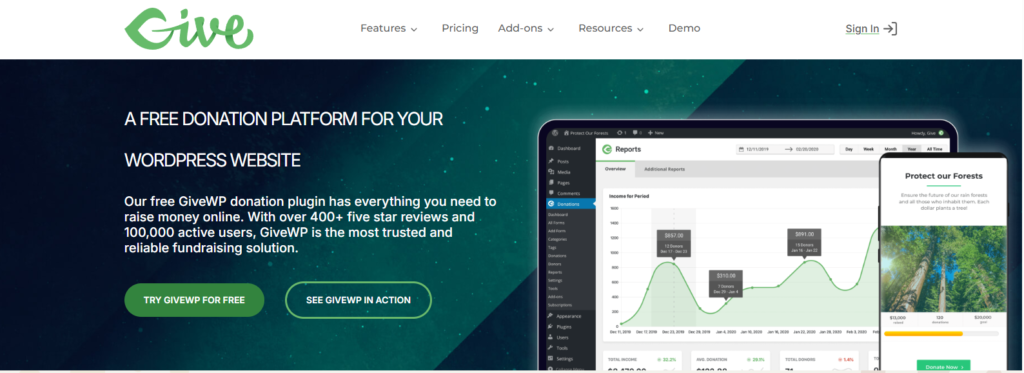
GiveWP is a WordPress plugin built specifically for online fundraising and donation management.
Unlike a general-purpose form plugin that can be configured to collect payments, GiveWP focuses specifically on donations. You can create donation forms, collect donor information, connect payment gateways, monitor fundraising activity, and manage donation records from the WordPress dashboard.
The plugin can be installed directly from the WordPress dashboard, and GiveWP says its free version can be used to start fundraising without purchasing a premium plan.
GiveWP also provides premium add-ons and plans for organizations that need more advanced functionality.
GiveWP Features
One of the main reasons organizations consider GiveWP is its collection of fundraising-focused features.
1. Custom Donation Forms
GiveWP allows you to create customizable donation forms for your WordPress website.
You can use different forms for different campaigns or fundraising purposes. For example, an organization could create separate forms for:
- General donations
- Emergency fundraising
- Education programs
- Medical assistance
- Community projects
- Church donations
- Specific fundraising campaigns
The free version includes unlimited donation forms, making it possible to create multiple forms without purchasing a premium plan.
2. Donor Management
GiveWP includes a donor database that allows organizations to keep track of donor information and donation activity.
This can be useful when an organization wants to understand its donors rather than simply process individual transactions.
The donor management functionality is included in the free version according to GiveWP’s current pricing information.
For a small nonprofit that is just beginning online fundraising, having donor information inside the WordPress dashboard can simplify administration.
3. Fundraising Reports
Another important feature is fundraising reporting.
GiveWP provides reporting tools that help organizations monitor donation activity and fundraising performance. Reports can help you understand how much money has been collected and analyze your fundraising activity.
The official GiveWP pricing page lists fundraising reports among the core features available with the free version.
For organizations running multiple campaigns, reporting becomes especially useful because it provides a centralized view of donation activity.
4. Recurring Donations
Recurring donations are useful when you want supporters to contribute regularly instead of making only a one-time payment.
GiveWP offers a Recurring Donations add-on that provides flexible recurring donation options and subscription management. Donors can manage recurring subscriptions through the donor dashboard, while administrators can manage subscriptions from the GiveWP dashboard.
The Recurring Donations add-on is currently listed at $149 per year when purchased separately. It is also included with higher GiveWP plans.
This feature can be particularly useful for nonprofits that want to build a recurring donor program.
5. Payment Gateways
Payment gateway support is an important consideration for any donation plugin.
GiveWP’s free version includes Stripe and PayPal. The platform also offers additional payment gateways through premium add-ons and plans.
GiveWP lists several additional gateway options, including Authorize.Net and other regional gateways. Its add-on directory also includes options such as Razorpay and CCAvenue.
This is particularly relevant for international organizations or nonprofits that need payment methods beyond PayPal and Stripe.
6. Fee Recovery
Payment processing fees can reduce the amount an organization receives from each donation.
GiveWP offers a Fee Recovery add-on that can allow donors to cover associated fees. The official add-on directory lists Fee Recovery among its premium fundraising tools.
For organizations processing a large number of donations, this can be an important feature.
7. Donation Funds and Designations
Organizations sometimes need donors to choose where their money should go.
For example, a nonprofit might have separate funds for:
- Education
- Food assistance
- Medical support
- Building projects
- Emergency relief
GiveWP’s Funds and Designations add-on allows organizations to create multiple funds and let donors choose where their donation should be allocated. It also provides reporting by fund.
The add-on is currently listed at $149 per year as an individual purchase.
8. Peer-to-Peer Fundraising
Peer-to-peer fundraising can allow supporters to participate in fundraising campaigns and help promote an organization’s cause.
GiveWP includes peer-to-peer fundraising in its higher-tier plans. The Pro plan includes this functionality, while the Agency plan includes it along with the broader GiveWP feature set.
This feature can be useful for organizations running community campaigns, sponsored events, challenges, or supporter-led fundraising.
9. Integrations
GiveWP supports integrations with various services and marketing tools.
Its current add-on ecosystem includes integrations such as:
- Zapier
- Google Analytics
- Mailchimp
- Salesforce
- Constant Contact
- AWeber
- ConvertKit
These integrations can help organizations connect donation activity with analytics, email marketing, CRM, and automation workflows.
GiveWP Pricing
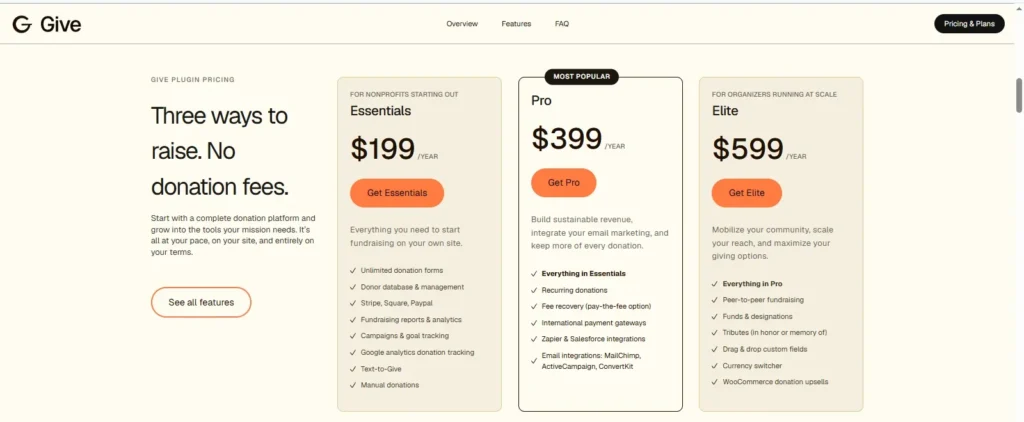
GiveWP offers three paid plans designed for nonprofits and organizations with different fundraising needs. The current plans shown by GiveWP are Essentials at $199/year, Pro at $399/year, and Elite at $599/year.
GiveWP Essentials – 9/Year
The Essentials plan is designed for nonprofits that are starting online fundraising. It includes unlimited donation forms, donor database and management tools, Stripe, Square and PayPal support, fundraising reports and analytics, campaigns and goal tracking, Google Analytics donation tracking, Text-to-Give, and manual donations.
GiveWP Pro – 9/Year
The Pro plan is aimed at organizations looking to build sustainable donation revenue. It includes everything in Essentials, along with recurring donations, fee recovery, international payment gateways, Zapier and Salesforce integrations, and email integrations such as Mailchimp, ActiveCampaign, and ConvertKit.
GiveWP Elite – 9/Year
The Elite plan is designed for organizations running fundraising campaigns at scale. It includes everything in Pro, plus peer-to-peer fundraising, funds and designations, tribute donations, drag-and-drop custom fields, a currency switcher, and WooCommerce donation upsells.
GiveWP’s plan structure allows organizations to start with core donation and donor-management features and move to higher plans when they need recurring donations, advanced integrations, peer-to-peer fundraising, or other advanced fundraising tools.
Is GiveWP Free?
Yes. GiveWP has a free core plugin.
The free version includes features such as unlimited donation forms, donor management, fundraising reports, PayPal, and Stripe.
However, free does not mean that all donation-related costs disappear.
Payment processors can charge their own transaction fees. GiveWP also notes that Stripe on its free plan has an additional 2% fee on one-time donations, while payment gateways have their own processing fees.
Therefore, organizations should consider both plugin costs and payment processing costs when calculating their fundraising expenses.
GiveWP Pros and Cons
Pros
1. Free version available
You can start with the free plugin without immediately purchasing a premium plan.
2. Donation-focused features
GiveWP is designed specifically for fundraising rather than being a general contact or payment form plugin.
3. Unlimited donation forms
The free version supports unlimited donation forms.
4. Donor management
The built-in donor database can help organizations manage donor information.
5. Multiple payment options
Stripe and PayPal are available in the free version, while additional gateways are available through add-ons and paid plans.
6. Recurring donations
The Recurring Donations add-on provides tools for subscription-style donations.
7. Large add-on ecosystem
Organizations can expand GiveWP with integrations and fundraising tools.
Cons
1. Advanced features require paid plans or add-ons
Features such as recurring donations, fee recovery, and additional payment gateways may require additional purchases.
2. Costs can increase as requirements grow
An organization needing several premium features may need a higher-tier plan rather than relying on the free plugin.
3. Payment processing fees still apply
Using GiveWP does not eliminate the fees charged by payment processors.
4. Advanced fundraising may require more configuration
Organizations using multiple campaigns, gateways, integrations, and fundraising tools may need more setup than a simple donation form requires.
GiveWP vs a Basic WordPress Form Plugin
One question many WordPress users may have is whether they should use GiveWP or simply create a donation form with a general-purpose form plugin.
The answer depends on what you need.
A basic form plugin may be enough if you only need a simple payment form.
GiveWP becomes more relevant when you need dedicated fundraising functionality such as:
- Donor management
- Fundraising reports
- Multiple donation forms
- Recurring donations
- Donation campaigns
- Fee recovery
- Fund designations
- Peer-to-peer fundraising
- Donation-specific integrations
Because GiveWP is built around fundraising, its feature set is structured around donation management rather than general website forms.
How to Install GiveWP in WordPress
Getting started with GiveWP is relatively straightforward.
1. Log in to WordPress
Open your WordPress dashboard.
2. Go to Plugins
Navigate to:
Plugins → Add New
3. Search for GiveWP
Search for GiveWP.
4. Install the Plugin
Click Install Now and then activate the plugin.
GiveWP’s official documentation confirms that the core plugin can be installed through the WordPress plugin interface.
5. Configure Your Donation Settings
After activation, configure the donation settings and connect your preferred payment gateway.
6. Create a Donation Form
Create a donation form and configure:
- Donation amounts
- Custom amounts
- Donor fields
- Payment method
- Confirmation message
- Receipt settings
7. Publish Your Form
Add the donation form to the appropriate page on your website.
GiveWP provides documentation covering installation, configuration, payment gateways, troubleshooting, add-ons, and other core functionality.
Is GiveWP Easy to Use?
For someone familiar with WordPress, the basic GiveWP setup should be relatively easy to understand.
The free plugin provides the core components needed to start collecting donations, while additional features can be added as an organization’s fundraising requirements grow.
However, there is a difference between creating a basic donation form and building a complete fundraising system.
A simple website may only require:
GiveWP + payment gateway + donation form
A larger organization may need:
GiveWP + recurring donations + CRM + email marketing + analytics + multiple payment gateways + reporting + peer-to-peer fundraising
As more components are added, configuration becomes more involved.
GiveWP maintains documentation covering core features and add-ons, which can help with setup and troubleshooting.
Who Should Use GiveWP?
GiveWP can be considered by several types of WordPress websites.
Nonprofit Organizations
Nonprofits can use donation forms, donor management, reporting, recurring donations, and fundraising campaigns.
Charities
Charities can create dedicated donation pages and use multiple funds or campaigns.
Churches and Religious Organizations
Organizations collecting regular contributions can use donation forms and recurring donation functionality.
Community Organizations
Community groups can create dedicated campaigns for specific causes.
Fundraising Websites
Websites running fundraising campaigns can use features such as peer-to-peer fundraising and donor management.
However, the right setup depends on the organization’s payment requirements, fundraising model, budget, and technical needs.
GiveWP Review: Final Verdict
GiveWP is a WordPress-focused fundraising plugin with a free core version and a broad selection of premium add-ons.
Its free version provides a useful starting point with unlimited donation forms, donor management, fundraising reports, Stripe, and PayPal. Organizations that need more advanced functionality can add features such as recurring donations, additional payment gateways, fee recovery, fund designations, integrations, and peer-to-peer fundraising.
The main consideration is cost. While the core plugin is free, organizations needing several advanced features may need a paid plan or multiple add-ons. Payment processor fees also need to be considered separately.
For a small organization that only needs basic online donations, starting with the free version can be a practical way to evaluate the plugin. For organizations with more complex fundraising requirements, the premium plans provide additional tools and support.
Overall, this GiveWP Review shows that the plugin is designed for organizations that want to manage donations directly through WordPress rather than relying solely on an external fundraising platform.