To create a website that is quick, polished, and easy to use, you must select the appropriate WordPress theme. GeneratePress stands out with its lightweight design, flexible customization, and performance-focused approach, making it a strong choice for bloggers, affiliate marketers, and businesses.
But is GeneratePress worth your investment in 2026? In this GeneratePress Review, we’ll explore its features, pricing, pros and cons, and premium options to help you decide whether it’s the right theme for your website.
| Category | Our assessment |
|---|---|
| Performance potential | Excellent |
| Customization | Very good |
| Ease of use | Good |
| SEO fundamentals | Very good |
| Beginner-friendliness | Good, with some learning required |
| Blog and affiliate websites | Excellent fit |
| Ecommerce compatibility | Good |
| Overall recommendation | Recommended for performance-focused websites |
What Is GeneratePress?
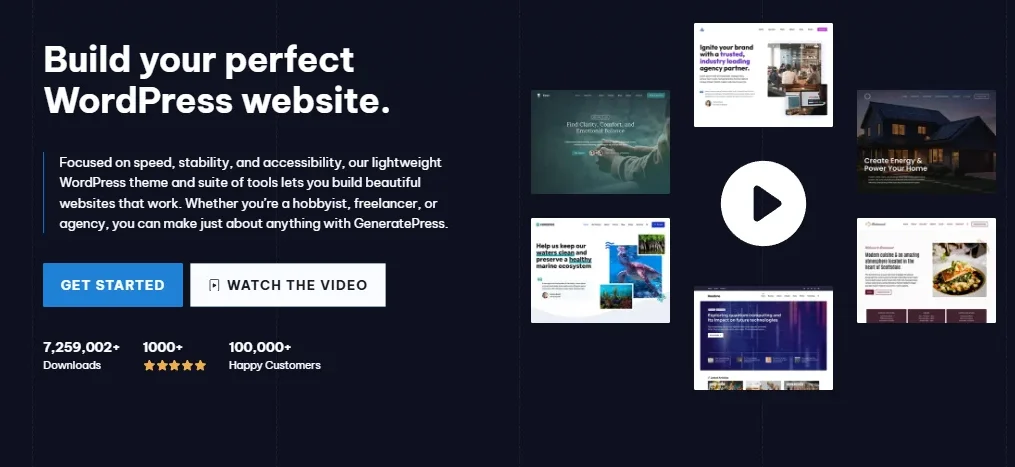
GeneratePress is a lightweight WordPress theme developed by Tom Usborne. It is designed to provide a clean foundation for building different types of websites, including personal blogs, company websites, portfolio sites, online publications, and WooCommerce stores.
Unlike themes that bundle extensive animations, complicated design systems, and numerous additional features, GeneratePress emphasizes simplicity. You can begin with a basic layout and add only the functionality your website requires.
The theme works with the native WordPress block editor, making it possible to create pages and publish articles without relying entirely on a third-party page builder. Users who need additional flexibility can also explore GenerateBlocks and compatible page-building plugins.
GeneratePress is available in a free version, while its premium offering unlocks more advanced customization and website-building capabilities.
For website owners who prioritize content, usability, and performance over decorative effects, this approach can be particularly useful.
GeneratePress Features
In this GeneratePress Review, we found that the theme offers a lightweight foundation, flexible customization options, and compatibility with essential WordPress tools.
1. Lightweight Design and Performance
One of the main reasons website owners consider GeneratePress is its performance-focused design.
A WordPress theme contributes to the resources a browser must download and process when displaying a page. Themes that load unnecessary scripts, stylesheets, fonts, and visual effects can increase page weight and complicate optimization.
GeneratePress aims to keep the theme itself lean, giving website owners more control over the additional features they introduce.
This approach can benefit:
- Blogs with many published articles.
- Affiliate websites containing product comparisons and reviews.
- Business websites that need fast, accessible pages.
- Mobile visitors using slower internet connections.
- Publishers who want to optimize Core Web Vitals.
However, choosing a lightweight theme does not automatically make an entire website fast. Your hosting provider, caching configuration, image sizes, third-party scripts, plugins, and content layout also affect performance.
For the best results, use GeneratePress with optimized images, reliable WordPress hosting, and an appropriate caching solution. Test important pages using Google PageSpeed Insights rather than assuming that the theme alone guarantees a particular score.
2. Flexible Customization Options
GeneratePress provides customization controls that help you adjust the appearance of your website without editing theme files.
You can customize elements such as:
- Website colors and typography.
- Header and navigation layouts.
- Content width and spacing.
- Sidebar placement.
- Blog and archive layouts.
- Footer presentation.
- Responsive layout settings.
The free version includes useful customization options, while GP Premium expands the available styling and layout controls.
This flexibility is valuable when you want to create a recognizable website design without building a completely custom WordPress theme.
For example, an affiliate marketing website can use a simple header, readable article layouts, comparison tables, and clearly positioned calls to action. A business website can instead prioritize service pages, contact information, and a more corporate layout.
3. Responsive and Mobile-Friendly Layouts
Mobile usability is essential because visitors access websites from smartphones, tablets, laptops, and desktop computers.
GeneratePress is designed to support responsive layouts, helping website content adapt to different screen sizes. Its straightforward design provides a useful starting point for creating pages that remain readable across devices.
Nevertheless, responsive behavior also depends on how you build your pages. Large tables, oversized images, complicated navigation menus, and poorly configured page-builder elements can still create problems on smaller screens.
After customizing your website, check the following:
- Can visitors read articles without zooming?
- Does the navigation menu work comfortably on mobile?
- Are buttons large enough to tap?
- Do comparison tables fit smaller screens?
- Are images properly sized and displayed?
- Is important content easy to find?
These checks help ensure that your website remains practical rather than simply looking attractive on a desktop monitor.
4. WordPress Block Editor Compatibility
GeneratePress works with the native WordPress block editor, also known as Gutenberg.
The block editor allows you to create and arrange content using individual blocks for headings, paragraphs, images, buttons, lists, and other elements.
This is particularly useful for bloggers and affiliate publishers who regularly create product reviews, tutorials, hosting comparisons, and informational articles.
You can structure content using WordPress’s existing editing tools without needing a separate visual builder for every page.
For more advanced block-based designs, GenerateBlocks can extend the editing experience with additional layout and design capabilities. GenerateBlocks Pro offers further features for users who want more extensive control over their page designs.
Keep in mind that GeneratePress, GP Premium, GenerateBlocks, and GenerateBlocks Pro are related but distinct products. You do not necessarily need to purchase the entire collection to build a functional website.
5. GP Premium and Advanced Design Controls
The free GeneratePress theme is sufficient for many basic websites, but some users need more control over their layouts.
GP Premium extends the theme with additional website-building features. Depending on the functionality you need, these can include:
- The Site Library with pre-designed starter websites.
- Advanced layout and spacing controls.
- Additional navigation options.
- Sticky navigation and mobile header options.
- Blog archive layout variations.
- WooCommerce-specific customization.
- Advanced Elements and hook-based content placement.
- Additional theme-building and styling capabilities.
These features can make a difference when managing a content-heavy website or building multiple client websites.
For example, you may want different headers for separate sections of your website, customized layouts for particular post types, or promotional content placed at specific points in your articles.
GP Premium provides tools for this type of customization, although some advanced implementations may require familiarity with WordPress concepts.
Before upgrading, identify the specific features you need. If the free theme already supports your current website design, purchasing premium features may not be necessary.
6. Starter Sites and Pre-Built Designs
Building a website from a blank canvas can take considerable time, especially if you are new to WordPress design.
GeneratePress addresses this through its Site Library, which provides starter websites that you can import and customize.
Starter designs can help you establish a basic structure for a blog, business website, or other project. Instead of creating every layout from scratch, you can start with an existing design and replace the sample content with your own.
This can save time on:
- Setting up initial page layouts.
- Choosing typography and colors.
- Creating a consistent design.
- Establishing navigation and content structure.
- Preparing a starting point for customization.
Access to the Site Library requires the relevant premium offering. The number of available designs depends on the product or subscription you choose.
Keep in mind that importing a starter website may add pages, images, posts, and customization settings. Back up an existing website before importing a design, and remove unnecessary demo content after the import.
7. SEO-Friendly Website Structure
Search engine optimization involves more than installing a theme. Your website also needs useful content, descriptive titles, logical navigation, appropriate internal links, and a technically sound structure.
GeneratePress provides a clean foundation for implementing these practices. Its lightweight approach, responsive layouts, and compatibility with WordPress SEO plugins make it suitable for content publishers.
You can use it alongside plugins such as Rank Math SEO or Yoast SEO to manage tasks including:
- SEO titles and meta descriptions.
- XML sitemaps.
- Schema markup.
- Canonical URLs.
- Content optimization.
- Breadcrumb configuration.
- Indexing controls.
The theme does not guarantee higher Google rankings, and installing it will not automatically increase impressions or organic traffic.
Instead, GeneratePress gives you a foundation on which you can implement sound technical SEO practices. The quality of your articles, search intent alignment, website authority, competition, and overall user experience remain important factors.
If you publish affiliate reviews, organize your content into relevant categories, link related articles naturally, and make it easy for visitors to compare products.
8. WooCommerce Compatibility
GeneratePress can also be used to build an online store with WooCommerce.
This makes it a possible option for businesses that want to sell physical products, digital downloads, or other items through WordPress.
A lightweight theme can provide a useful starting point for an ecommerce website, but store performance also depends on product images, payment gateways, additional plugins, inventory management, and checkout functionality.
GP Premium adds extra WooCommerce customization controls for users who need more design flexibility.
Before choosing GeneratePress for a large store, consider whether its available layout controls meet your requirements. Stores that need highly specialized product pages or complex shopping experiences may require additional plugins or custom development.
GeneratePress Pricing: Free vs Premium
Pricing is an important consideration when selecting a WordPress theme, especially if you are starting a new blog or affiliate website on a limited budget.
GeneratePress offers a free theme, an individual premium theme upgrade, and a broader product bundle called GeneratePress One.
The official pricing page currently lists the following prices in US dollars. Source: GeneratePress official pricing.
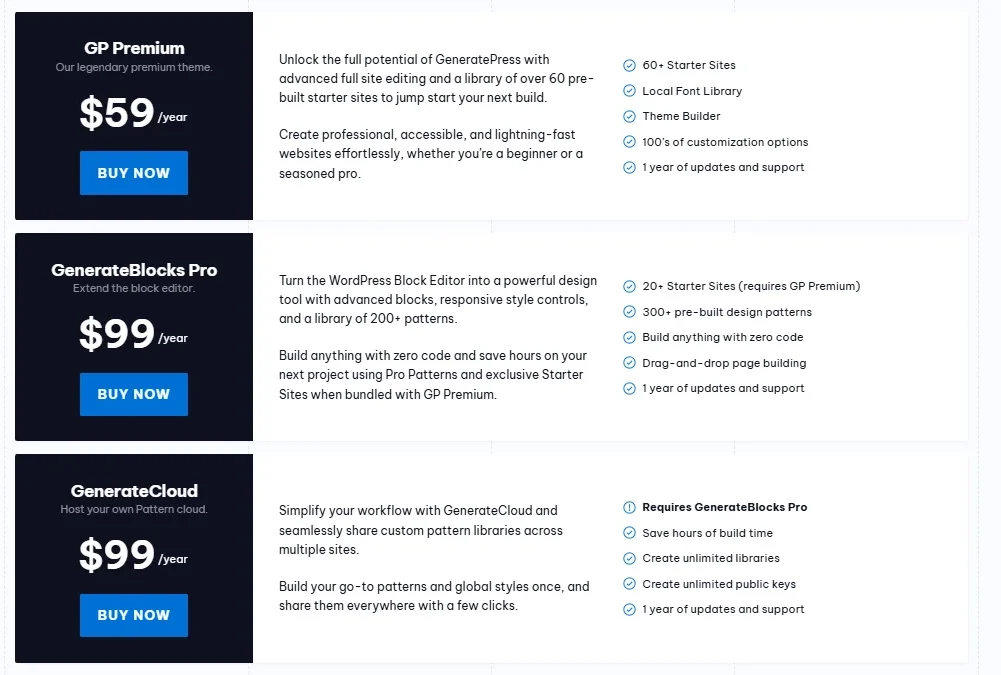
| Plan | Price | Best for |
|---|---|---|
| GeneratePress Free | $0 | Basic blogs and small websites |
| GP Premium | $59/year | Advanced theme customization |
| GeneratePress One | $149/year | Users who need the wider product suite |
Prices are subject to change. Check the official website for current offers, taxes, and license terms before purchasing.
GeneratePress Free
The free version is a good starting point if you want to build a simple website without paying for a premium theme.
It provides a lightweight foundation, responsive layouts, basic customization options, and WordPress block editor compatibility.
It is suitable for:
- Personal blogs.
- New affiliate websites.
- Small business websites.
- Informational websites.
- Simple portfolios.
If you are comfortable using the standard WordPress editor and do not need advanced theme-building tools, the free version may be all you need.
GP Premium — Per Year
GP Premium is the individual premium theme offering listed on the official pricing page.
It adds more customization options and access to the Site Library, along with advanced theme-building and layout functionality.
It may be worthwhile if you want to create a more distinctive website, manage complex content layouts, or reduce the amount of custom development needed for your design.
The annual subscription includes one year of updates and support. Check the current licensing terms for details about site usage and renewal.
GeneratePress One — 9 Per Year
GeneratePress One is a broader subscription that includes GP Premium, GenerateBlocks Pro, and GenerateCloud.
It is intended for users who want access to the wider GeneratePress product ecosystem through one subscription.
The official offering includes a larger collection of starter sites and design patterns, along with priority email support and access to future products covered by the subscription.
This plan may suit designers, developers, and agencies that use multiple tools in their website-building workflow.
However, it is unnecessary to buy the complete bundle if you only need the basic theme or a limited set of premium features.
Which GeneratePress Plan Should You Choose?
Choose the free theme if you are launching your first blog or building a straightforward website.
Choose GP Premium if you need advanced layout options, starter designs, and additional customization controls.
Choose GeneratePress One if you expect to use GenerateBlocks Pro, GenerateCloud, and the other included products as part of your regular workflow.
Our recommendation: Start with the free version if you are unsure. Upgrade only when you identify a specific limitation that affects your website.
GeneratePress Pros and Cons
Every WordPress theme involves trade-offs. GeneratePress focuses on performance and flexibility, which makes it appealing to some website owners but less suitable for others.
Pros
1. Lightweight foundation
GeneratePress emphasizes a lean design, helping you avoid unnecessary theme features that you may never use.
2. Useful free version
You can launch a functional website without purchasing a premium subscription.
3. Flexible customization
The theme offers controls for colors, typography, layouts, navigation, and other important design elements.
4. WordPress block editor support
You can build and manage content using WordPress’s native editing experience.
5. Suitable for content websites
Its straightforward structure works well for blogs, affiliate marketing websites, and online publications.
6. Premium features for advanced users
GP Premium adds starter sites, additional design controls, and more advanced website-building functionality.
7. WooCommerce compatibility
You can use GeneratePress as the foundation for an online store.
8. Useful for developers
Its customization capabilities and hook-based options can support more advanced website implementations.
Cons
1. The default design is simple
If you want a highly styled website immediately after installation, you will need to spend time customizing it.
2. Advanced features require payment
The Site Library and various advanced design controls are part of the premium offering rather than the free theme.
3. There is a learning curve
Some features, especially advanced Elements and hook-based customization, can take time to understand.
4. Additional design tools may be necessary
Users who want extensive visual design options may prefer to add GenerateBlocks or another compatible page builder.
5. Performance still requires optimization
A lightweight theme cannot compensate for poor hosting, oversized images, excessive plugins, or inefficient third-party scripts.
6. The complete bundle may be unnecessary
GeneratePress One can offer value to users who need several products, but it may be excessive for someone who only wants a basic WordPress theme.
GeneratePress vs Other WordPress Themes
GeneratePress is not the only lightweight WordPress theme available. Astra and Kadence are also worth considering, depending on your preferred design workflow.
| Feature | GeneratePress | Astra | Kadence |
|---|---|---|---|
| Main appeal | Lightweight foundation and control | Broad customization and starter designs | Visual design flexibility |
| Free version | Yes | Yes | Yes |
| Suitable for blogs | Yes | Yes | Yes |
| Suitable for business sites | Yes | Yes | Yes |
| Block editor support | Yes | Yes | Yes |
| WooCommerce compatibility | Yes | Yes | Yes |
| Best suited to | Performance-focused builders | Users seeking flexible general-purpose designs | Users who want design controls and ready-made layouts |
This is a general feature comparison, not a controlled performance test. Features and licensing differ between free and paid versions, so check each product’s current specifications.
GeneratePress vs Astra
GeneratePress is a strong choice if you prefer a straightforward theme with an emphasis on a lean foundation and controlled customization.
Astra may appeal to users who want a broad selection of starter templates and a general-purpose design workflow.
Your decision should depend on how you plan to build the website, which features you need, and how much customization you are willing to do.
GeneratePress vs Kadence
GeneratePress emphasizes simplicity and a performance-focused starting point.
Kadence offers another approach for users who want accessible design controls and a visual workflow for building pages and layouts.
Both can be suitable for blogs, business websites, and content marketing projects. Before choosing between them, try their free versions and see which interface makes your preferred workflow easier.
Who Should Use GeneratePress?
GeneratePress is particularly suitable for website owners who want control over design without starting with a theme full of unnecessary features.
Bloggers and Content Publishers
If you publish articles regularly, GeneratePress provides a practical foundation for readable layouts, category pages, navigation, and related content.
Affiliate Marketers
Affiliate websites often need product reviews, comparison tables, promotional links, and clear calls to action.
GeneratePress can support this structure without requiring a complicated theme. You can combine it with your preferred SEO and comparison-table plugins.
For an affiliate website, remember that theme selection is only one part of the process. Helpful product analysis, transparent affiliate disclosures, original insights, and well-organized content matter just as much.
Small Business Owners
Businesses can use GeneratePress to create service pages, company information, contact pages, and lead-generation forms.
Its flexible layout controls allow you to establish a professional appearance without necessarily hiring a developer for every design change.
Freelancers and Web Developers
Developers and freelancers may appreciate the theme’s customization options and the ability to build different layouts for different clients.
The appropriate premium license can also cover client-site work within the official licensing terms.
Who Should Consider Another Theme?
GeneratePress may not be the best fit if you want an elaborate, highly designed website with minimal setup or rely on extensive built-in animation and visual effects.
You may also prefer another solution if its editing workflow does not match your design preferences.
In these cases, compare a few alternatives before committing to a paid subscription.
How to Get Started With GeneratePress
Installing GeneratePress is straightforward if you already have a WordPress website.
- Log in to your WordPress dashboard.
- Navigate to Appearance → Themes → Add New Theme.
- Search for GeneratePress.
- Install the official theme and activate it.
- Open the theme customization settings and adjust your colors, typography, navigation, and layout.
- Create or update your pages and posts using the WordPress block editor.
- If you need advanced functionality, review GP Premium and the available companion products.
- Test your website on mobile devices and check important pages with Google PageSpeed Insights.
If you are customizing an existing website, back it up before making major design changes. Check your menus, widgets, page layouts, and any theme-specific functionality after activation.
You can download or review the theme through the official GeneratePress website.
Final Verdict: Is GeneratePress Worth It in 2026?
This GeneratePress Review shows why GeneratePress is worth considering for bloggers, affiliate marketers, and business owners looking for a flexible WordPress theme.
Its free version is useful for starting a blog or small business website, while GP Premium offers additional design controls and theme-building features for more demanding projects. GeneratePress One provides a broader package for users who also need the companion products.
The main trade-off is that GeneratePress does not try to deliver an elaborate design without effort. You may need to customize the theme or use additional tools to achieve the exact look you want.
For bloggers, affiliate marketers, and developers who prefer a clean starting point, this can be an advantage rather than a disadvantage.