Website security is one of the most important aspects of managing a WordPress website. Whether you run a personal blog, business website, affiliate marketing site, or WooCommerce store, protecting your website from hackers, malware, spam, and unauthorized access should be a priority.
WordPress is a flexible content management system, but its security also depends on how you manage your website. Outdated plugins, weak passwords, vulnerable themes, and poorly configured hosting environments can create opportunities for attackers. A compromised website may lose visitors, expose customer information, display malicious content, or suffer damage to its search engine rankings.
Fortunately, the best WordPress security plugins can help website owners monitor suspicious activity, scan for malware, strengthen login protection, and block malicious requests. Some tools provide a comprehensive security solution, while others specialize in particular tasks, such as malware scanning or firewall protection.
In this guide, we will compare seven popular WordPress security plugins in 2026, explain their important features, and help you choose the right option for your website.
Best WordPress Security Plugins
| Security Plugin | Best For | Free Version | Main Features |
|---|---|---|---|
| Wordfence Security | Overall website protection | Yes | Firewall, malware scanning, login security |
| Sucuri Security | Security monitoring and hardening | Yes | Activity logs, file integrity monitoring, hardening |
| Solid Security | Login and account protection | Yes, with paid options | Two-factor authentication, security policies |
| Jetpack Protect | Vulnerability monitoring | Yes, with paid options | Vulnerability scanning, security alerts |
| All-In-One Security (AIOS) | Beginners and security controls | Yes, with paid options | Login protection, firewall rules, hardening |
| MalCare | Malware detection and cleanup options | Yes, with paid options | Malware scanning, cleanup tools, protection |
| BulletProof Security | Users who want advanced configuration | Yes, with paid options | Security hardening, login protection, monitoring |
Features and paid-plan availability can change. Check each plugin’s official website before purchasing.
1. Wordfence Security — Best Overall WordPress Security Plugin
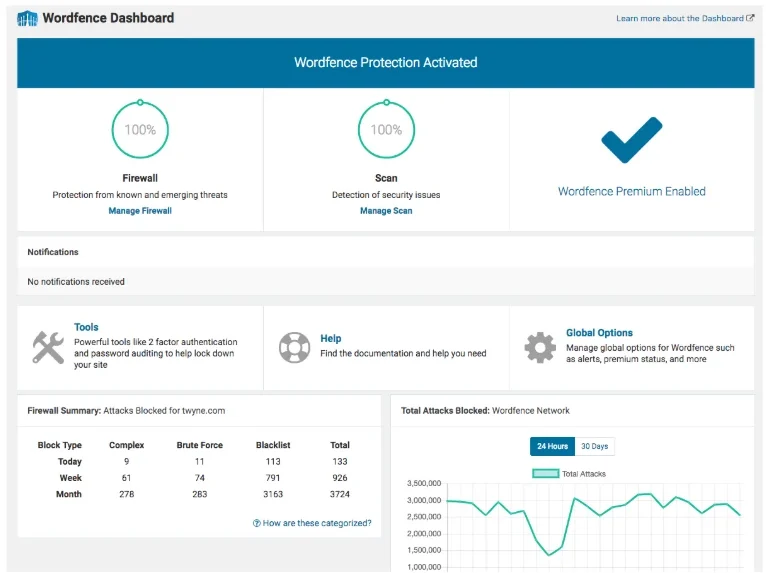
Wordfence Security is one of the most recognized security plugins in the WordPress ecosystem. It combines a web application firewall, malware scanner, login protection, and security alerts in a single plugin.
It is a strong starting point for bloggers, affiliate marketers, small businesses, and website administrators who want to manage security directly from their WordPress dashboard.
The free version includes an endpoint firewall and malware scanner, along with tools such as two-factor authentication and protection against brute-force login attempts. Wordfence Premium adds real-time firewall rule and malware signature updates, an IP blocklist, country-blocking options, and priority support.
Key Features
- Web application firewall: Helps identify and block malicious requests targeting WordPress.
- Malware scanning: Checks website files for known malware and suspicious changes.
- Login security: Supports two-factor authentication and protection against repeated login attempts.
- Vulnerability alerts: Helps administrators identify potential security issues.
- Wordfence Central: Allows users to monitor and manage multiple websites from a central dashboard.
- Premium protection: Provides faster access to new firewall rules and malware signatures.
Pros
- Useful combination of firewall and malware-scanning tools.
- Free version offers a substantial set of security features.
- Security information is available inside the WordPress dashboard.
- Suitable for many personal and business websites.
Cons
- The free version receives new firewall rules and malware signatures after a delay.
- Security scans can consume server resources on some hosting plans.
- Advanced features and priority support require a paid plan.
Who Should Use Wordfence?
Wordfence is a good choice if you want a comprehensive security plugin without immediately purchasing a subscription. It is particularly useful for WordPress blogs, affiliate websites, and small business websites that need firewall protection and malware monitoring.
Our verdict: Wordfence is our leading recommendation for website owners seeking an all-in-one WordPress security solution with a capable free version.
2. Sucuri Security — Best for Security Monitoring and Hardening
Sucuri is a well-known website security company that offers security monitoring, malware cleanup services, and firewall protection. Its WordPress security plugin helps administrators monitor website activity and strengthen their installations.
The free plugin includes security activity auditing, file integrity monitoring, remote malware scanning, blocklist monitoring, security notifications, and hardening options. However, the free plugin should not be confused with Sucuri’s paid website firewall and security services.
Key Features
- Security activity auditing: Records important security-related events on the website.
- File integrity monitoring: Helps identify unexpected changes to website files.
- Remote malware scanning: Checks the website for certain indicators of malicious activity.
- Security hardening: Provides options to strengthen the WordPress installation.
- Blocklist monitoring: Helps identify potential reputation and security problems.
- Paid website firewall: Offers additional traffic filtering and protection against certain attacks.
Pros
- Useful security monitoring and auditing tools.
- Free plugin available for WordPress users.
- Provides hardening options for improving website security.
- Paid services offer additional protection and professional assistance.
Cons
- The free plugin does not include every feature offered by Sucuri’s paid services.
- Some advanced protection requires separate configuration or a subscription.
- Users may need additional tools for a complete malware prevention and login security setup.
Who Should Use Sucuri?
Sucuri is worth considering if you want to monitor security events and harden your WordPress installation. Businesses that require an additional layer of protection outside WordPress can also evaluate its paid firewall services.
Our verdict: Choose Sucuri if security monitoring, hardening, and optional managed security services are important to your website.
3. Solid Security — Best for Login Protection
Solid Security, previously known as iThemes Security, focuses on helping website owners reduce common security risks. It is particularly relevant for websites where protecting administrator accounts and preventing unauthorized access are major priorities.
The plugin offers security features that can help strengthen authentication, identify suspicious activity, and enforce safer login practices. Available features depend on the version and plan you choose.
Key Features
- Two-factor authentication: Adds another verification step beyond a password.
- Login security: Helps protect accounts against unauthorized access.
- Password security: Supports stronger authentication practices.
- Security monitoring: Helps administrators review security-related events.
- Site hardening: Provides settings intended to reduce common WordPress security risks.
- Advanced options: Paid plans may provide additional security management and monitoring features.
Pros
- Useful focus on account and login protection.
- Suitable for business websites with multiple users.
- Encourages stronger authentication practices.
- Provides security controls for administrators.
Cons
- Some features require a paid plan.
- The number of available settings may be confusing for beginners.
- It should not automatically be treated as a replacement for every firewall or malware-scanning service.
Who Should Use Solid Security?
Solid Security is worth considering for membership websites, business websites, and WordPress installations with several administrator or editor accounts. It can be particularly helpful when you want stronger login policies.
Our verdict: Solid Security is a good option for website owners who prioritize login protection and account security.
4. Jetpack Protect — Best for Vulnerability Monitoring
Jetpack Protect is designed to help WordPress users identify security vulnerabilities and monitor potential risks. It is useful for website owners who want an accessible way to check whether their WordPress installation may be affected by known vulnerabilities.
Keeping plugins, themes, and WordPress itself updated is essential because outdated software can expose websites to known security problems. A vulnerability-monitoring tool can help you identify issues that require attention.
Key Features
- Vulnerability scanning: Helps identify known security vulnerabilities in supported WordPress components.
- Security notifications: Helps administrators discover issues that need review.
- WordPress integration: Provides a familiar experience for WordPress users.
- Additional paid features: Availability depends on the Jetpack product and subscription selected.
Pros
- Useful for monitoring known vulnerabilities.
- Helps website owners identify potentially outdated or vulnerable components.
- Suitable for bloggers and smaller websites.
- Can complement regular WordPress maintenance.
Cons
- Vulnerability monitoring is not the same as complete website protection.
- Available features depend on the selected version or plan.
- Users may need a separate firewall or additional tools for other security requirements.
Who Should Use Jetpack Protect?
Jetpack Protect is a sensible option if your primary goal is to monitor vulnerabilities and keep track of security risks affecting WordPress components.
Our verdict: Consider Jetpack Protect as part of a broader security routine, particularly if vulnerability monitoring is your main requirement.
5. All-In-One Security (AIOS) — Best for Beginners
All-In-One Security, often called AIOS, is a WordPress security plugin that provides controls for improving login security, protecting website files, and applying security hardening measures.
It can appeal to beginners who want to explore different security settings from a WordPress dashboard. However, website owners should understand what each setting does before enabling advanced restrictions.
Key Features
- Login protection: Offers controls to reduce the risk of repeated unauthorized login attempts.
- Firewall rules: Helps filter certain unwanted requests.
- Security hardening: Provides options for strengthening WordPress configuration.
- File protection: Includes controls related to selected files and directories.
- Account security: Supports safer management of WordPress access.
- Advanced options: Additional functionality may be available through paid offerings.
Pros
- Offers a broad range of security controls.
- Free version available.
- Helps users learn about WordPress security hardening.
- Can be configured for different website requirements.
Cons
- Advanced settings can be confusing for first-time users.
- Incorrect configuration may interfere with legitimate website functionality.
- Not every advanced protection feature is available in the free version.
Who Should Use AIOS?
AIOS can be a good option for bloggers and small business owners who want greater control over WordPress security settings. Beginners should start with basic settings, test their website, and enable additional restrictions gradually.
Our verdict: AIOS is worth considering if you want configurable security and hardening features in one plugin.
6. MalCare — Best for Malware Detection and Cleanup Options
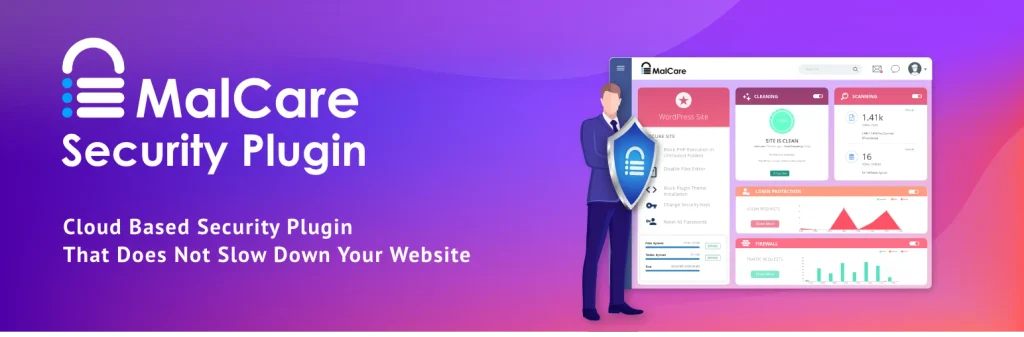
MalCare is a WordPress security service that focuses on malware detection, website protection, and cleanup options. It is worth evaluating if you manage a business website or online store where a malware infection could cause significant disruption.
MalCare uses a scanning approach designed to help identify malware while limiting the impact of scans on the hosting server. Available features vary by plan.
Key Features
- Malware scanning: Helps identify malicious code and potential infections.
- Malware cleanup options: Paid plans offer additional cleanup capabilities.
- Website protection: Provides security features intended to reduce the risk of attacks.
- Security alerts: Helps notify administrators about identified problems.
- Management features: Certain plans offer tools for managing multiple websites.
Pros
- Focuses on malware detection and cleanup.
- Can be useful for website owners managing several WordPress installations.
- Paid options provide additional support and protection.
- Worth considering for websites that require dedicated malware security features.
Cons
- Advanced features may require a subscription.
- You should verify exactly which scanning and cleanup features are included in your selected plan.
- A malware scanner alone cannot prevent every type of attack.
Who Should Use MalCare?
MalCare is worth evaluating for business websites, affiliate websites, and online stores that need additional malware detection or cleanup options.
Our verdict: Consider MalCare if malware detection and access to cleanup services are central to your security requirements.
7. BulletProof Security — Best for Advanced Configuration
BulletProof Security is another WordPress security plugin that provides tools for strengthening website protection. It is often considered by administrators who want access to additional configuration options.
Depending on the version, its features can include login protection, security hardening, monitoring, and configuration tools. As with any advanced security plugin, you should check compatibility and understand settings before making changes.
Key Features
- Security hardening: Helps apply selected security-related configuration changes.
- Login protection: Offers controls intended to reduce unauthorized access.
- Monitoring tools: Helps administrators manage selected security checks.
- Configuration options: Provides settings for users who want more control over their installation.
- Additional paid functionality: Check the current product details for the features available in each version.
Pros
- Offers configuration options for experienced administrators.
- Can help strengthen selected aspects of a WordPress installation.
- Provides a free version to evaluate.
- May suit users who prefer more direct control over security settings.
Cons
- The interface and settings may be less approachable for beginners.
- Incorrect configuration can cause website access or compatibility issues.
- Users should confirm that the current feature set meets their needs before installing it.
Who Should Use BulletProof Security?
BulletProof Security may suit experienced WordPress administrators who are comfortable configuring security settings and testing changes.
Our verdict: Consider it when advanced configuration is important to you, but beginners may find a more straightforward plugin easier to manage.
Which WordPress Security Plugin Should You Choose?
The best WordPress security plugin depends on your website’s size, security requirements, technical experience, and budget.
Here are our recommendations for common use cases:
- Best overall: Wordfence Security — a strong combination of firewall, malware scanning, and login protection.
- Best for security monitoring: Sucuri Security — useful auditing, monitoring, and hardening features.
- Best for login protection: Solid Security — worth considering for authentication and account security.
- Best for vulnerability monitoring: Jetpack Protect — helps identify known vulnerabilities.
- Best for configurable security: All-In-One Security — provides several security and hardening controls.
- Best for malware cleanup options: MalCare — useful when malware scanning and cleanup services are priorities.
- Best for advanced configuration: BulletProof Security — worth evaluating for experienced administrators.
For most small WordPress websites, starting with Wordfence’s free version is a practical choice. If your main concern is monitoring security events rather than managing a comprehensive firewall, Sucuri’s free plugin may be more appropriate.
Remember that no plugin can guarantee complete protection. Your hosting environment, password practices, updates, backups, and overall configuration are equally important.
Free vs Paid WordPress Security Plugins
Many WordPress security plugins provide free versions, but paid plans may offer more advanced protection, faster updates, professional support, or additional services.
When Is a Free Security Plugin Enough?
A free plugin can be a reasonable starting point for a personal blog, portfolio, or small website when combined with good security practices.
Look for features such as:
- Basic malware scanning.
- Login protection.
- Security alerts.
- Support for two-factor authentication.
- Useful hardening controls.
However, check the exact limitations of the free version. For example, Wordfence Free receives new firewall rules and malware signatures after a delay compared with its Premium version.
When Should You Pay for Security?
Consider a paid security solution when your website handles customer information, processes online payments, generates substantial business revenue, or requires faster security updates and professional assistance.
A paid plan may also be useful if you manage multiple client websites or need help responding to an actual security incident.
Before purchasing, compare renewal prices, the number of covered websites, malware cleanup policies, firewall functionality, and support response commitments.
How to Choose the Best WordPress Security Plugin
Before installing a plugin, consider the following factors.
1. Firewall Protection
A web application firewall can help block malicious requests before they cause harm. Some firewalls operate within WordPress, while others filter traffic through an external service.
If your website faces frequent attacks, check how the firewall works and whether it protects against the types of threats relevant to your site.
2. Malware Scanning
A malware scanner helps identify suspicious files, malicious code, or other indicators of compromise. However, different scanners use different detection methods, and no scanner can guarantee detection of every infection.
3. Login Security
Use strong passwords and enable two-factor authentication where possible. Login protection can also help reduce repeated unauthorized login attempts.
4. Performance and Compatibility
Security plugins may use server resources when scanning files or processing requests. Choose a solution that works well with your hosting plan, caching system, and other plugins.
After installation, check your website’s front end, login page, forms, and checkout process.
5. Updates and Support
Select a plugin with a clear update history, appropriate documentation, and support options that match your needs. For business-critical websites, investigate the provider’s response process for security incidents.
6. Total Cost
A free plugin may be sufficient for basic needs, while a paid plan may be justified for a business website. Compare the annual cost with the protection and support you will actually use.
Essential WordPress Security Tips Beyond Plugins
Installing a security plugin is only one part of keeping your website safe. Follow these additional practices to improve your overall security.
Keep WordPress Updated
Install stable WordPress core, theme, and plugin updates promptly. Updates frequently include security fixes that address known vulnerabilities.
Remove inactive plugins and themes that you do not need, especially if they are no longer maintained.
Use Strong Passwords and Two-Factor Authentication
Use unique passwords for WordPress administrators, hosting accounts, and database access. Enable two-factor authentication where supported.
Avoid sharing administrator accounts among several people. Give each user only the permissions required for their role.
Create Regular Backups
Backups can help you recover from malware infections, accidental changes, and hosting problems. Maintain backups separately from your live website where possible, and periodically test the restoration process.
Do not assume that a security plugin automatically provides a complete backup solution.
Choose Reliable WordPress Hosting
A reputable hosting provider can contribute to website security through server maintenance, isolation, monitoring, and backup options. Review what your hosting plan actually includes rather than relying only on marketing claims.
Use HTTPS
Ensure that your website uses a valid SSL/TLS certificate and redirects visitors to HTTPS. HTTPS helps protect information in transit, but it does not by itself prevent malware or unauthorized access.
Monitor Your Website
Review security alerts, administrator accounts, and unexpected changes. If you suspect your website has been compromised, preserve a backup or copy for investigation, contact your hosting provider if necessary, and follow a careful cleanup and recovery process.
Final Verdict: Which Is the Best WordPress Security Plugin?
Choosing among the best WordPress security plugins comes down to identifying your website’s most important security needs.
For many website owners, Wordfence Security is the best starting point because it combines a firewall, malware scanning, and login protection in a single plugin. Sucuri is a strong alternative for security monitoring and hardening, while Solid Security is worth considering when login and account protection are priorities.
Jetpack Protect can help with vulnerability monitoring, AIOS offers configurable security controls, MalCare focuses on malware detection and cleanup options, and BulletProof Security may appeal to experienced administrators.
Whichever solution you select, remember that a security plugin is not a substitute for regular updates, strong passwords, two-factor authentication, secure hosting, and reliable backups.
Start with the protection your website needs today, review its security alerts regularly, and expand your setup as your website grows.