Choosing the right web hosting provider can make a big difference to your website’s speed, security, reliability, and long-term growth. While many hosting companies focus on low-cost shared hosting, Liquid Web takes a different approach by focusing more on managed hosting, VPS, dedicated servers, cloud solutions, and websites that need stronger resources.
But is Liquid Web actually worth the higher price?
In this Liquid Web review, we look at its performance, features, WordPress hosting, security, customer support, ease of use, pricing, pros and cons, and who should consider using it.
Liquid Web is a strong option for businesses, developers, agencies, and growing websites that need reliable infrastructure and responsive technical support. However, its premium pricing means it may not be the best choice for a small website or someone looking for the cheapest hosting plan.
What is Liquid Web?
Liquid Web is a web hosting company that specializes in higher-performance hosting solutions.
Its services include:
- Managed WordPress hosting
- Managed WooCommerce hosting
- VPS hosting
- Dedicated servers
- Cloud hosting
- Custom hosting solutions
Unlike many beginner-focused hosting companies, Liquid Web is aimed more at users who need greater control, resources, performance, and technical assistance.
Its managed WordPress offering is designed to handle many technical tasks for customers, allowing website owners to concentrate more on their content and business. The company also says its managed WordPress service handles technical maintenance of WordPress core.
Liquid Web Pricing
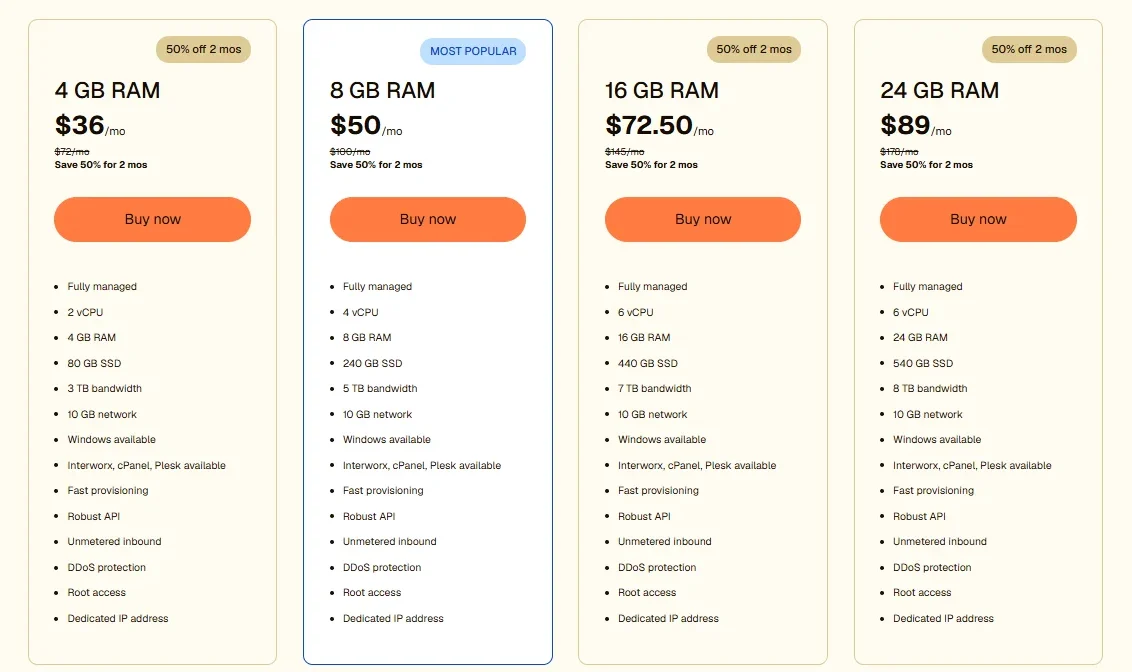
Managed VPS Hosting
- 4 GB RAM — $36/month
- 8 GB RAM — $50/month
- 16 GB RAM — $72.50/month
- 24 GB RAM — $89/month
Deep Information: Liquid Web
Pros and Cons of Liquid Web
Pros
- Strong performance
- Excellent technical support
- Managed WordPress options
- VPS and dedicated hosting available
- Developer-friendly tools
- Staging environments
- Backup options
- Multiple control-panel choices on applicable products
- Suitable for growing websites
- Custom hosting solutions available
Cons
- More expensive than many beginner hosting providers
- Some pricing can be difficult to understand at first
- Advanced hosting options may be overwhelming for beginners
- Some management features may be spread across different interfaces
- Not the best choice for a very small website with minimal traffic
- WhoIsHostingThis specifically noted pricing clarity and the presence of separate management portals as areas that could be improved.
Liquid Web Review at a Glance
| Category | Our Assessment |
|---|---|
| Performance | Excellent |
| WordPress Hosting | Excellent |
| Customer Support | Excellent |
| Security | Very Good |
| Developer Features | Excellent |
| Ease of Use | Very Good |
| Pricing | Expensive |
| Beginner Friendliness | Good, but not ideal for budget users |
| Best For | Businesses, developers, agencies, and growing websites |
Liquid Web Performance
- Website speed is one of the most important factors when selecting hosting.
- A faster server can help provide a better user experience, while a slow hosting environment can make an otherwise well-designed website feel sluggish.
- Both of the reviews we compared reported strong performance from Liquid Web, although their tests were performed at different times and under different conditions.
- WhoIsHostingThis reported an average first-byte response time of approximately 292 milliseconds in its testing.
- CatsWhoCode reported a 220 ms load time in its Pingdom test and PageSpeed scores of 98/100 on mobile and 99/100 on desktop for the WordPress site it tested. These are historical test results rather than a guarantee of what every Liquid Web customer will experience today.
- Actual website speed can vary depending on the website’s theme, plugins, images, database, traffic, geographic location, caching, and CDN configuration.
Is Liquid Web Fast?
Yes, Liquid Web has a strong reputation for performance, particularly for websites that have outgrown basic shared hosting.
However, you should not assume that simply moving a website to premium hosting will automatically produce a perfect PageSpeed score. Website optimization still matters.
Liquid Web WordPress Hosting
The platform is particularly useful for WordPress users who want managed hosting
Its managed WordPress environment is designed around performance, security, backups, staging, and WordPress management.
The CatsWhoCode review highlighted several useful WordPress features, including:
- Staging
- Backups
- SSL
- SSH access
- Git
- WP-CLI
- Managed hosting
- 24/7 support
A staging environment is especially useful for developers and website owners. It lets you test plugin updates, design changes, or other modifications before applying them to the live website.
Liquid Web Features
One of Liquid Web’s biggest advantages is the range of hosting and management options available.
Multiple Hosting Options
Depending on your project, you can choose from different types of infrastructure, including VPS, dedicated, cloud, and managed WordPress solutions.
This makes Liquid Web more suitable for websites that may need to grow beyond entry-level hosting.
Control Panels
For server hosting, its plans support different control-panel options.The WhoIsHostingThis review tested InterWorx and cPanel and noted that users can also encounter Plesk options.
This flexibility is useful for experienced users, although beginners may find multiple panels and account interfaces slightly confusing.
Staging and Backups
Staging and backup tools are valuable for WordPress websites.
Instead of experimenting directly on your live website, you can use a staging environment to test changes first.
Regular backups also provide an additional layer of protection if something goes wrong.
Developer Tools
The provider is not limited to basic WordPress management.
Developer-oriented features mentioned in the reviewed material include:
- SSH
- Git
- WP-CLI
- Staging environments
- Server-level access on applicable hosting products
These tools make Liquid Web particularly attractive to developers, agencies, and advanced WordPress users.
Liquid Web Security
Security is another important area where premium hosting can be valuable.
The reviewed Liquid Web hosting environment includes or supports features such as:
- SSL
- Firewalls
- Antivirus protection for applicable services
- Security monitoring
- Backups
- DDoS-related protection and infrastructure safeguards
WhoIsHostingThis rated Liquid Web’s security highly but also noted that some security-related configuration required assistance from support during testing.
For WordPress users, hosting security is only one part of the picture. You should still keep WordPress, themes, and plugins updated and use strong administrator passwords.
Liquid Web Customer Support
Customer support is one of Liquid Web’s strongest selling points.
WhoIsHostingThis gave Liquid Web 5/5 for support and reported positive experiences with its live chat team, including help during testing outside normal business hours.
CatsWhoCode also reported a positive support experience and highlighted Liquid Web’s 24/7 support model.
This can be particularly important for businesses where a hosting problem can affect sales, customers, or business operations.
Is Liquid Web Support Good?
Based on the two reviews compared here, support is one of Liquid Web’s strongest advantages.
If technical support is more important to you than finding the absolute lowest monthly price, Liquid Web becomes much more attractive.
Who Should Choose Liquid Web?
This service makes the most sense for:
- Growing Businesses
If your website is important to your business and you need more resources than basic shared hosting provides, Liquid Web is worth considering.
- High-Traffic Websites
Websites with increasing traffic can benefit from more powerful hosting infrastructure and the ability to move toward VPS, cloud, or dedicated solutions.
- WordPress Developers
Developers can benefit from tools such as SSH, Git, WP-CLI, and staging.
- Agencies
Agencies managing multiple websites may appreciate stronger infrastructure, technical support, and scalable hosting options.
- Users Who Want Managed Hosting
If you don’t want to spend your time dealing with server administration, managed hosting can reduce the technical workload.
Who Should Avoid Liquid Web?
This provider may not be the right choice if:
- You only need a basic personal website.
- Your website receives very little traffic.
- Your budget is extremely limited.
- You are looking specifically for the cheapest shared hosting.
- You don’t need advanced server or developer features.
- For a simple blog or small starter website, a less expensive hosting provider may offer better value.
Liquid Web vs Budget Hosting
The biggest difference between Liquid Web and budget hosting is the target customer.
Budget hosting generally focuses on affordability and simplicity.
Liquid Web focuses more on performance, managed services, technical support, and infrastructure that can handle more demanding projects.
That doesn’t mean Liquid Web is automatically better for everyone.
If you are building your first small blog, paying for advanced infrastructure may not make financial sense.
But if your website generates business revenue or has significant traffic, spending more on reliable hosting can be easier to justify.
Conclusion
This hosting provider is a strong premium option for users who need more than basic shared hosting.
The two reviews we compared reach a similar overall conclusion from different angles: Liquid Web performs well, provides strong support, and offers useful features, but its higher pricing is its biggest disadvantage.
For WordPress users, the combination of managed hosting, staging, backups, developer tools, and technical support makes Liquid Web an attractive option.
However, beginners with a small website should carefully compare the cost against their actual needs.